AI assistant
An AI assistant that prepares your rebate decisions, and never makes them
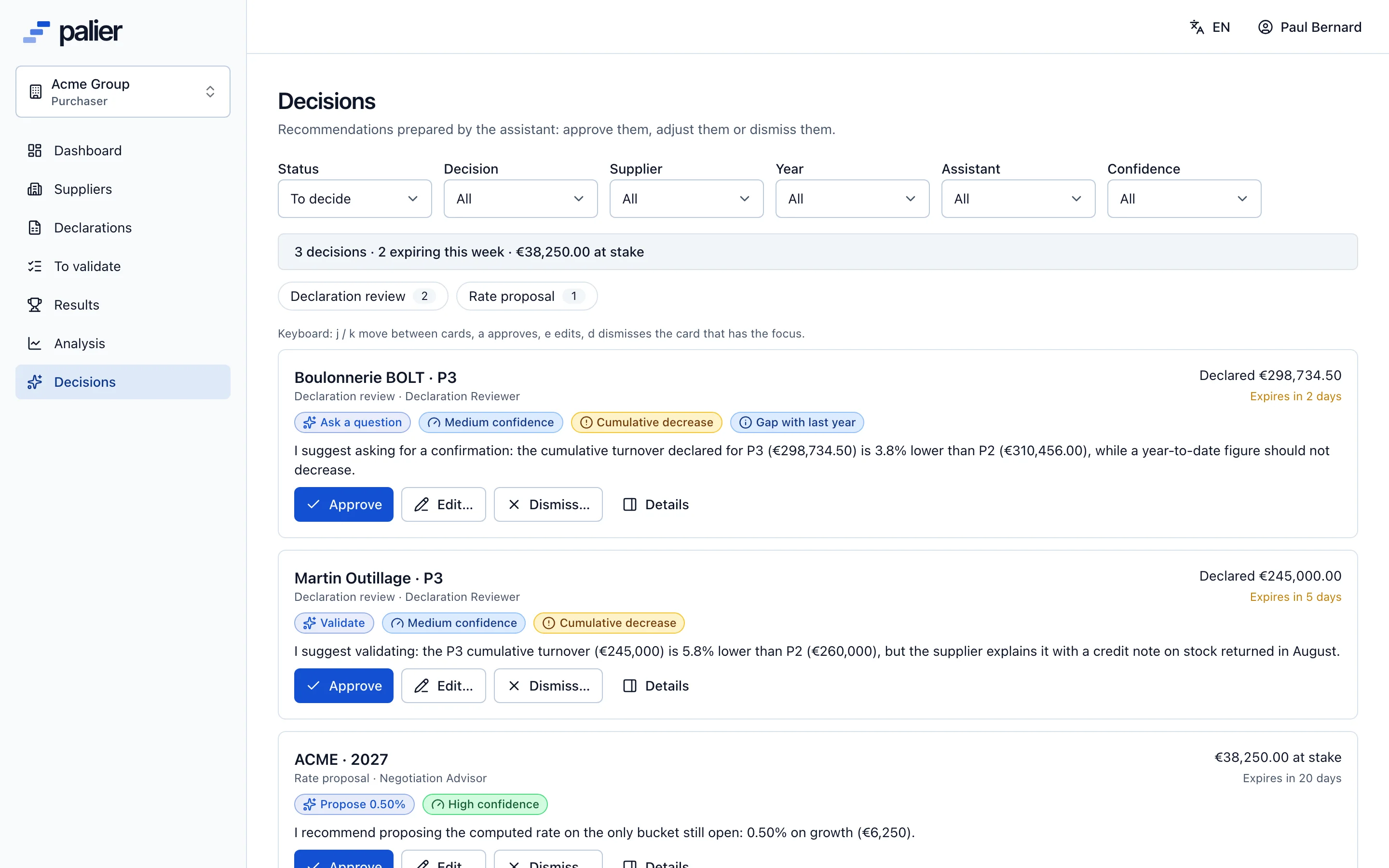
Reviewing a declaration, proposing a rate, answering a counter, chasing a supplier: the assistant gathers the facts, proposes a reasoned action and drafts the message. You approve in one click, edit or dismiss.
How it works
From business event to recorded decision
Whenever the process reaches a human decision, a specialised agent prepares a card. Nothing runs without you.
01
An event
A declaration is submitted, a result is computed, a supplier counters.
02
Computed facts
The engine computes the checks, the history, the distance to the tier and your policy’s range.
03
A specialised agent
It reasons over those facts only, picks an action and drafts a message in English and French.
04
A decision card
Proposed action, rationale, confidence, cited facts: nothing is executed yet.
05
Your decision
Approve, edit, or dismiss with a reason. You remain the author.
06
Execution and record
The normal service applies the action, the audit log links it to the card, memory keeps your choice.
The agents
One agent per decision, each with a narrow role
Each agent has its own instructions, read-only tools and a checked answer format. The account owner switches them on and sets their autonomy one by one.
Declaration review
For every submitted declaration: validate, ask a question (drafted) or refuse (reason drafted), from the checks and the supplier’s history.
Negotiation advisor
When a result is computed: a retained rate per scale, inside your policy’s range, with the reasoning in figures and the message to the supplier.
Counter evaluation
When a supplier counters: accept, propose a new rate in between, or ask for information.
Scale designer
For next year: candidate scales simulated on real turnover, with their effects and trade-offs.
Chasing and daily brief
Personalised reminders to late suppliers and, every morning, the day’s queue ordered by due date and amount at stake.
Analyst and contract extraction
Answers with figures and sources over your data, and a draft agreement extracted from a PDF or Excel contract, for a human to activate.
AI assistant
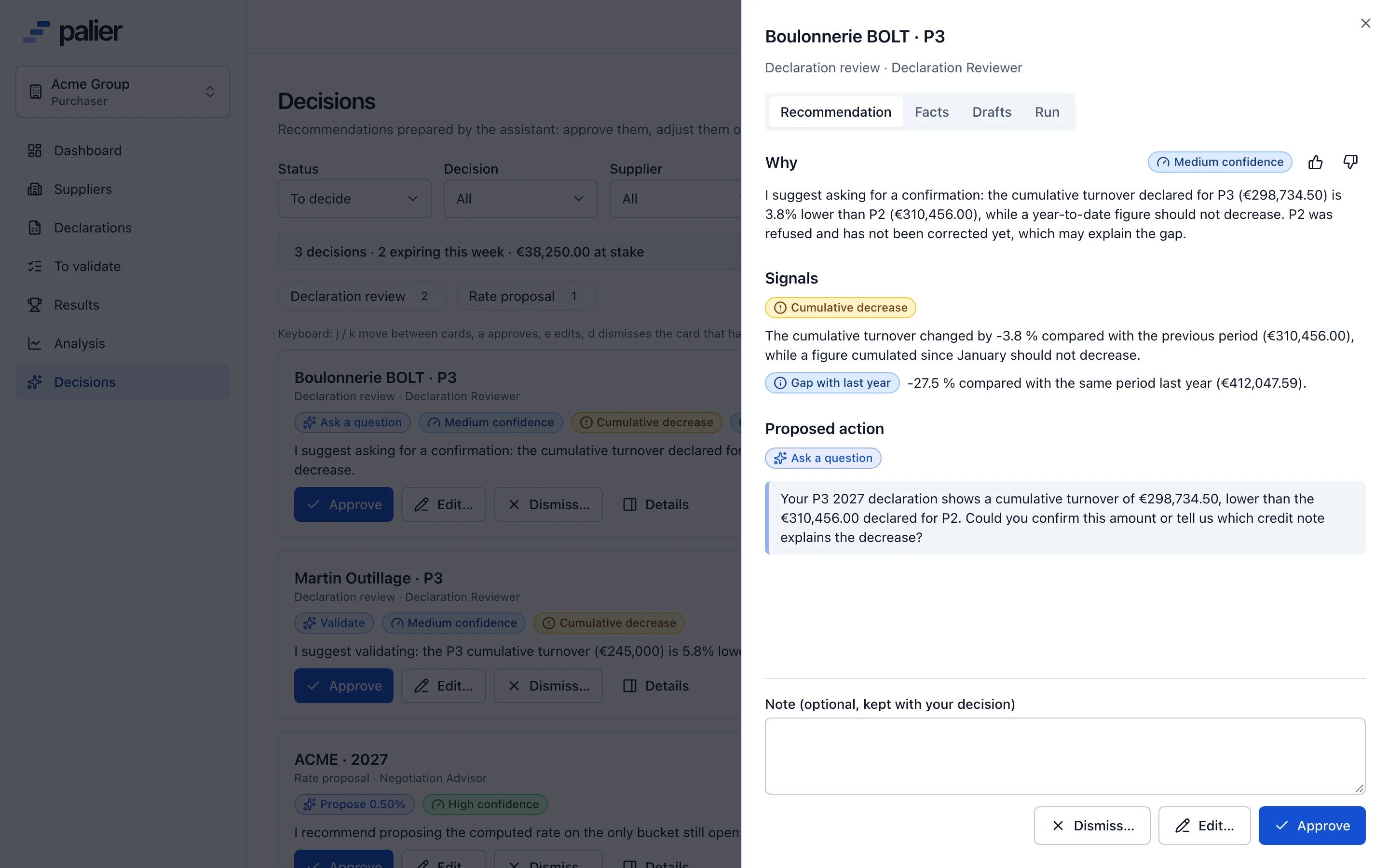
A complete card, one click away
A card’s detail shows everything the agent saw and everything it proposes. Editing the action turns the button into “Approve with changes”; the difference is recorded.
- Full rationale and confidence level
- Facts and checks used, figures highlighted
- Editable drafts in English and French
- Decision history for this supplier
The checks
Twelve checks computed before the AI thinks
These signals are deterministic rules computed by the engine. They are handed to the agent as facts and shown on the card: you always see why.
| Check | What it detects | Severity |
|---|---|---|
| Cumulative decrease | The declared cumulative turnover is lower than the previous period’s. | Check |
| Magnitude jump | A ×50 jump or three extra zeros: the classic euros-vs-cents or ×1000 mistake. | Blocking |
| Gap to last year | More than 30% change against the same period last year. | Check |
| Gap to the landing | On the last period, more than 15% away from the supplier’s full-year estimate. | Check |
| Unusual pace | The share of the year declared is far from other suppliers’ share at the same period. | Check |
| Inconsistent families | Families plus the “other” share do not add up to the total. | Blocking |
| Family shift | A family’s share of the total moves by more than 10 points. | Info |
| Round number | A total that is a multiple of €10,000: maybe an estimate rather than an actual. | Info |
| Late submission | Submitted after the entry window closed, through an override. | Info |
| Resubmission after refusal | The declaration was refused before; the previous reason is shown. | Info |
| First declaration | No history for this supplier, this year or last. | Info |
| Near a tier bound | On the last period, a total within 2% of a tier bound. | Info |
Autonomy
You choose what the assistant is allowed to do
0
Observe
Analyses and explanations, nothing to approve.
1
Draft
Draft messages and briefs, no action on the data.
2
Propose
A pre-filled action you approve, edit or dismiss.
3
Act alone
Present in the model but refused by the code: no decision is automatic.
Guardrails
Designed so you can trust it
No write access
The assistant can only create recommendations. Validating, refusing or proposing goes through the same service as a human click, with your permissions.
Checked figures
A card whose rationale cites a number absent from its facts is rejected before it reaches your queue.
Within your policy
The proposed rate stays between the computed rate and the maximum uplift you set; outside that range the card is refused.
Never on stale data
If the declaration or result changes after the card was computed, it is marked stale, regenerated, and cannot be executed.
Contained
Read-only tools scoped to the account, no web browsing, protection against instructions hidden in supplier messages.
Transparent
Each card shows the facts used, the model, the duration and the prompt version. Usage budget per account.
Questions about the AI assistant
Can the AI assistant validate a declaration on its own?
No. The assistant prepares a recommendation; only a person with the permission to validate can approve it. Automatic execution exists in the data model but is refused by the code.
What does the assistant base its proposals on?
On facts computed by Palier’s engine: the declaration checks, the supplier’s history this year and last, the landing, the distance to the next tier, your policy’s range and past decisions for the same supplier. The model reasons and writes; it computes no rate and no amount.
Which AI model is used?
Palier uses Anthropic’s Claude models, with a model suited to each task: a fast one for triage, a balanced one for review and negotiation, and a stronger one that can be selected for negotiation briefs.
Are our decisions used to train a model?
No. The assistant’s “memory” is a plain read of your past decisions for the same supplier, stored in your account. No model is trained on your data.
Can the assistant be switched off?
Yes, agent by agent. The account owner chooses for each one: off, observe, draft or propose, as well as the monthly budget.
Which language does the assistant write in?
The rationale is written in the language of the account’s purchasers, and every draft message exists in English and French, so you can write to each supplier in its language.
See Palier on your own tier scales
30 minutes through declarations, validation, calculation and negotiation of your rebates. Send us a scale and we will set it up for the demo.
- Demo on your sample data
- In English or French
- No commitment