Year-end supplier rebate management software
Supplier rebates, computed right and negotiated with confidence.
Palier brings purchasers and suppliers onto one platform: turnover declarations, validation, tiered scales, rebate calculation, negotiation of the rate and of next year’s scale. An AI assistant prepares every decision; you stay in charge.
- English and French
- Data isolated per account
- Every decision recorded
- Excel import and export
The problem
Rebates are simple on paper. Not in a spreadsheet.
A rate, a scale, a turnover figure: the formula fits on one line. What costs you is everything around it, supplier after supplier, period after period.
Files flying around
Every supplier sends its turnover in its own file, by email, with its own columns. Chasing late suppliers is done by hand.
Fragile formulas
A tiered scale in Excel is a cascade of nested IFs. One inserted row or one mistyped bound and the rebate is wrong without anyone noticing.
Errors spotted too late
A cumulative figure that goes down, an amount typed in cents, families that do not add up: found at year end, they turn into disputes.
Negotiations without memory
Who proposed which rate, when, and why? Without history every renegotiation starts from scratch and every audit becomes an investigation.
The full cycle
The whole rebate cycle, in one place
From the annual agreement to next year’s scale, every step has its place, its owner and its record. Purchasers and suppliers work on the same figures.
- 1
Purchaser + supplier
Annual agreement
Tier scale, product families, growth bonus, whole or marginal rate.
- 2
Supplier
Declarations
Cumulative turnover each period, split by family, plus the landing forecast.
- 3
Purchaser
Validation
Variance checks, a question or a reasoned refusal, bulk validation.
- 4
Automatic
Rebate calculation
Tier reached, computed rate and amount per scale, as soon as the last period is validated.
- 5
Purchaser ⇄ supplier
Negotiation
Proposal, counter, acceptance. PDF recap once finalised.
- 6
Purchaser ⇄ supplier
Next year’s scale
Simulated on the year’s validated turnover, proposed, accepted: it becomes the next agreement.
The scale accepted for next year becomes the following agreement: the cycle starts again.
The product
Built for rebates, and only for rebates
Not another ERP: a precise tool that speaks the language of purchasers and suppliers. Screenshots of the application on its demo data.
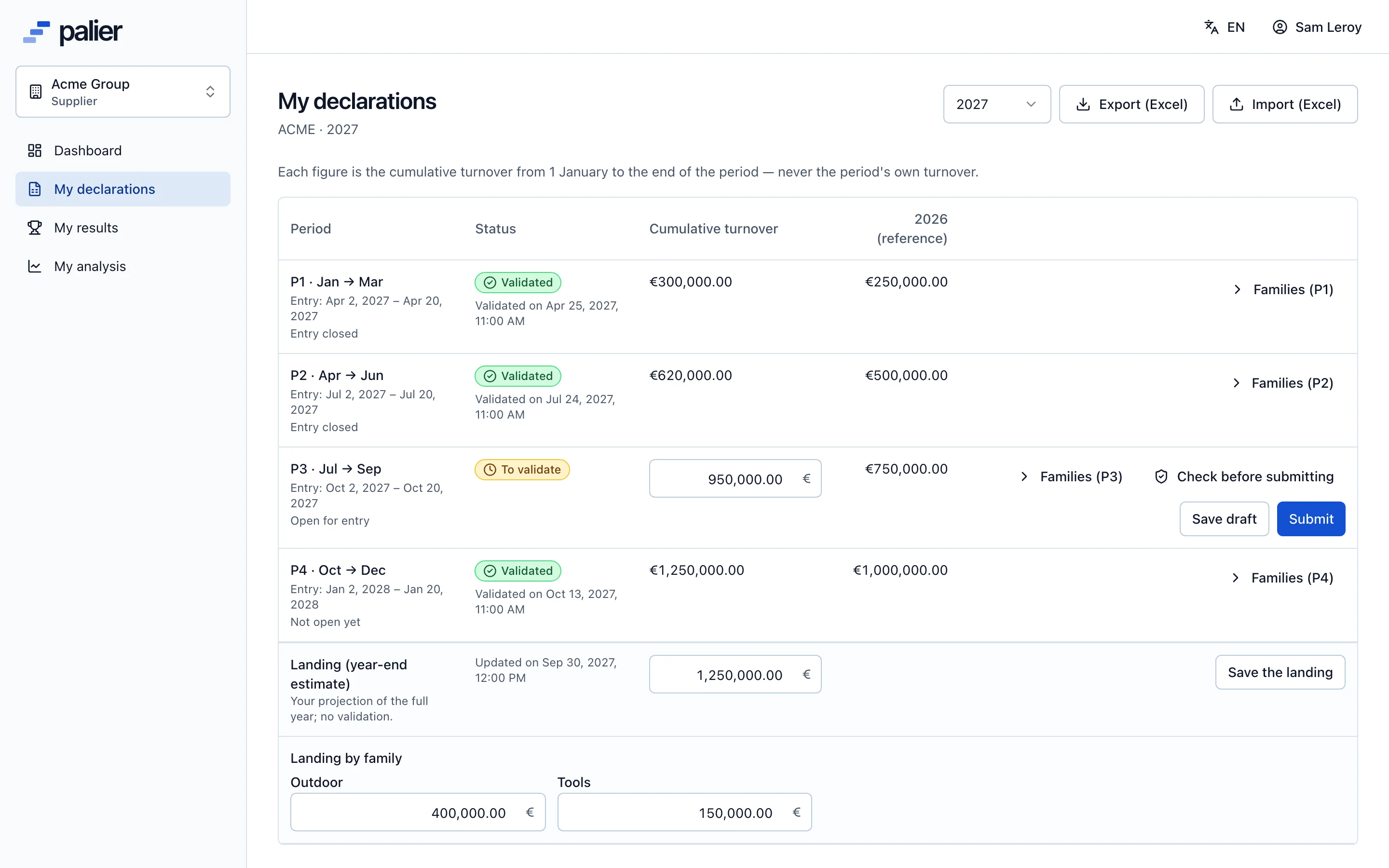
Declarations
Reliable turnover, entered at the source
Each supplier declares its own cumulative turnover, period by period, in a clear grid. Split by product family, full-year landing, Excel import: the data arrives clean.
- 1 to 12 periods per year, with entry and validation windows
- Split by product family with a consistency check
- Draft, submitted, refusal reason: a clear state for every period
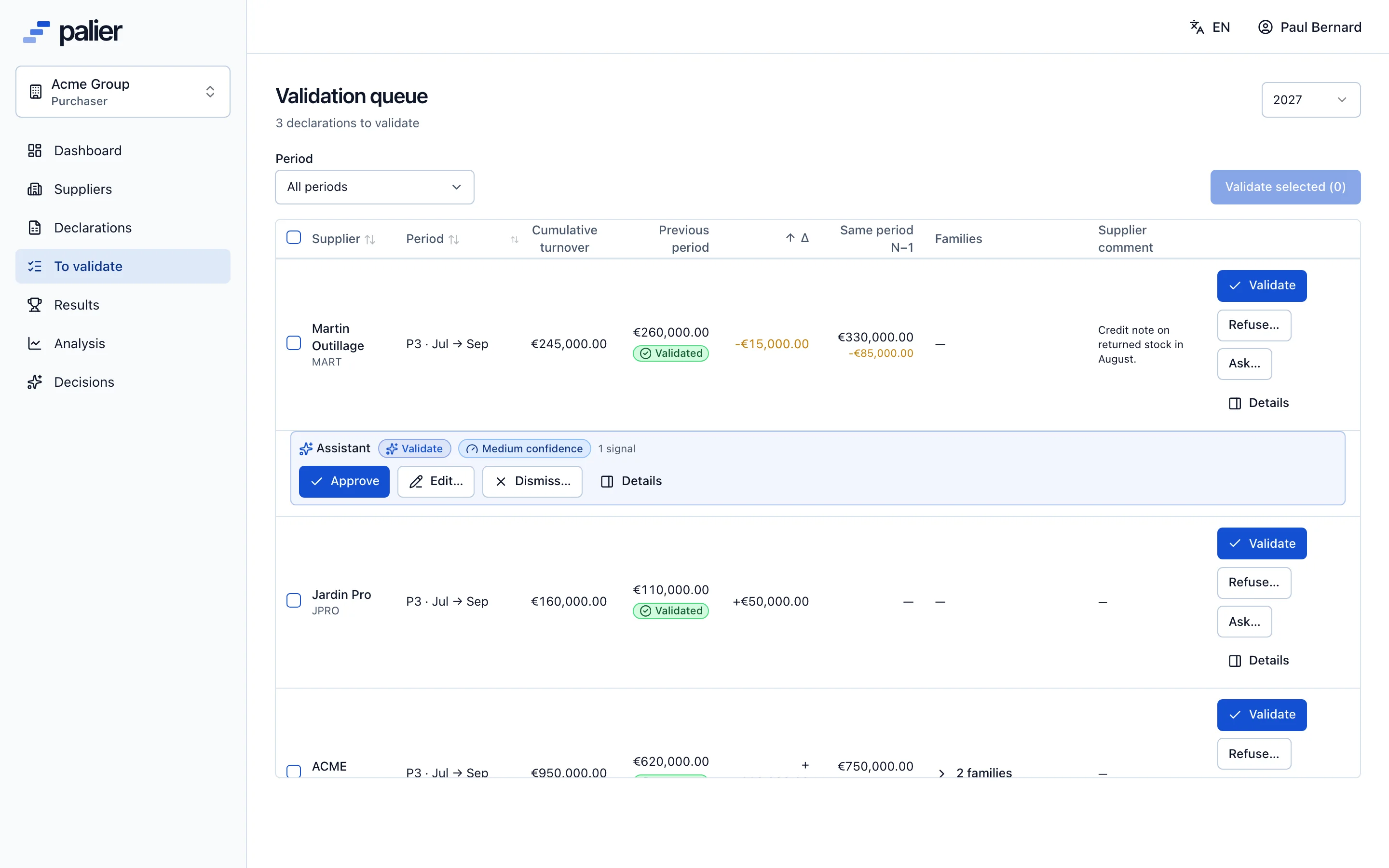
Validation
Guided validation, one by one or in bulk
The validation queue shows what changed: the variance with the previous period and with last year, the supplier’s comment. Validate in one click, ask a question or refuse with a reason.
- Twelve automatic checks: cumulative decrease, ×1000 error, gap to the landing…
- Bulk validation of declarations without anomalies
- Every validation time-stamped and attributed
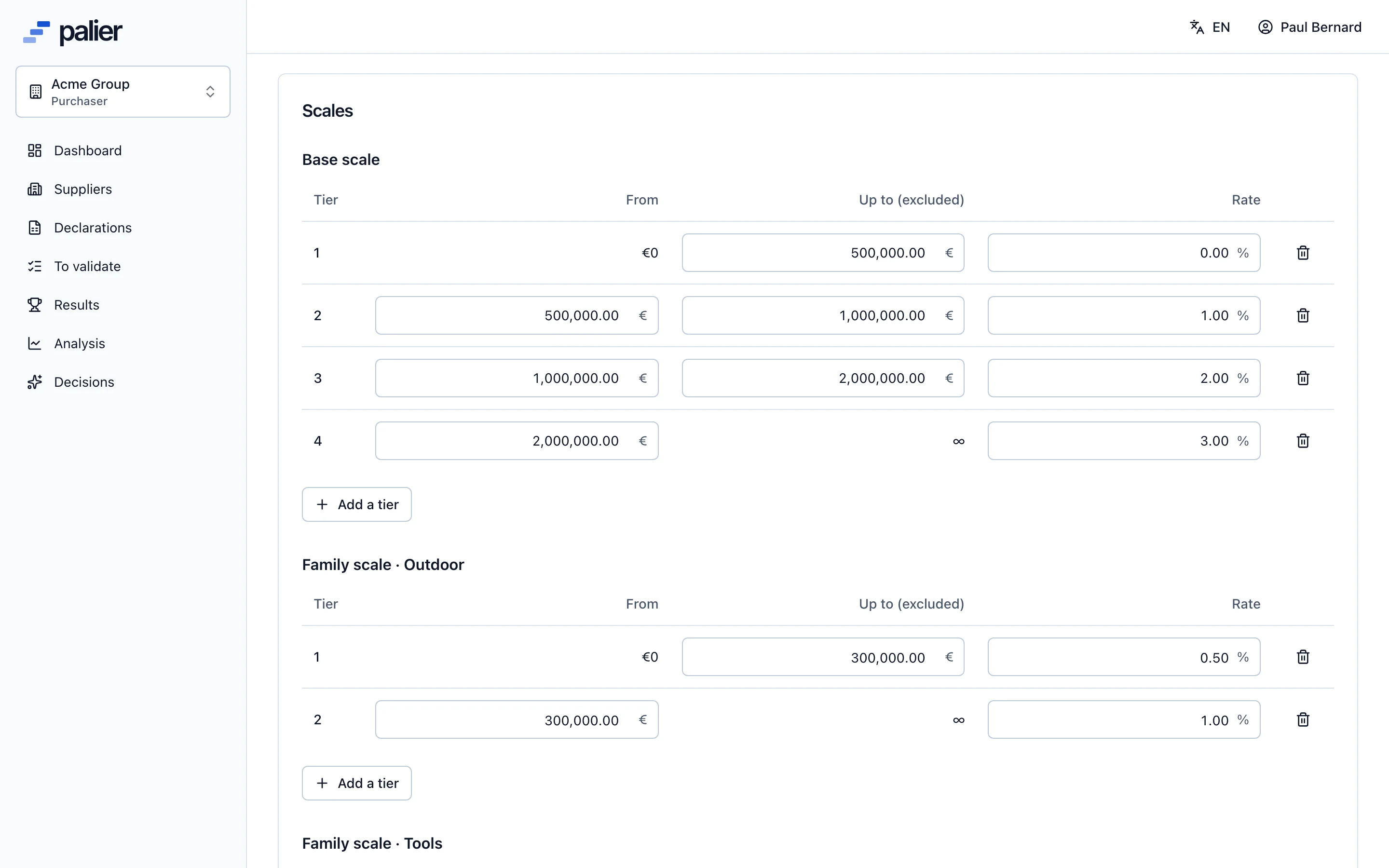
Scales
Scales that follow your agreements, not the other way round
Base scale, product family scales, growth bonus: build each supplier’s agreement tier by tier. Whole or marginal rate, as you choose, for each kind of scale.
- Contiguous tiers checked live, last tier without a ceiling
- Growth bonus on the variation in amount or in percent
- Instant preview of the rebate for any turnover
Calculation and negotiation
Exact calculation, recorded negotiation
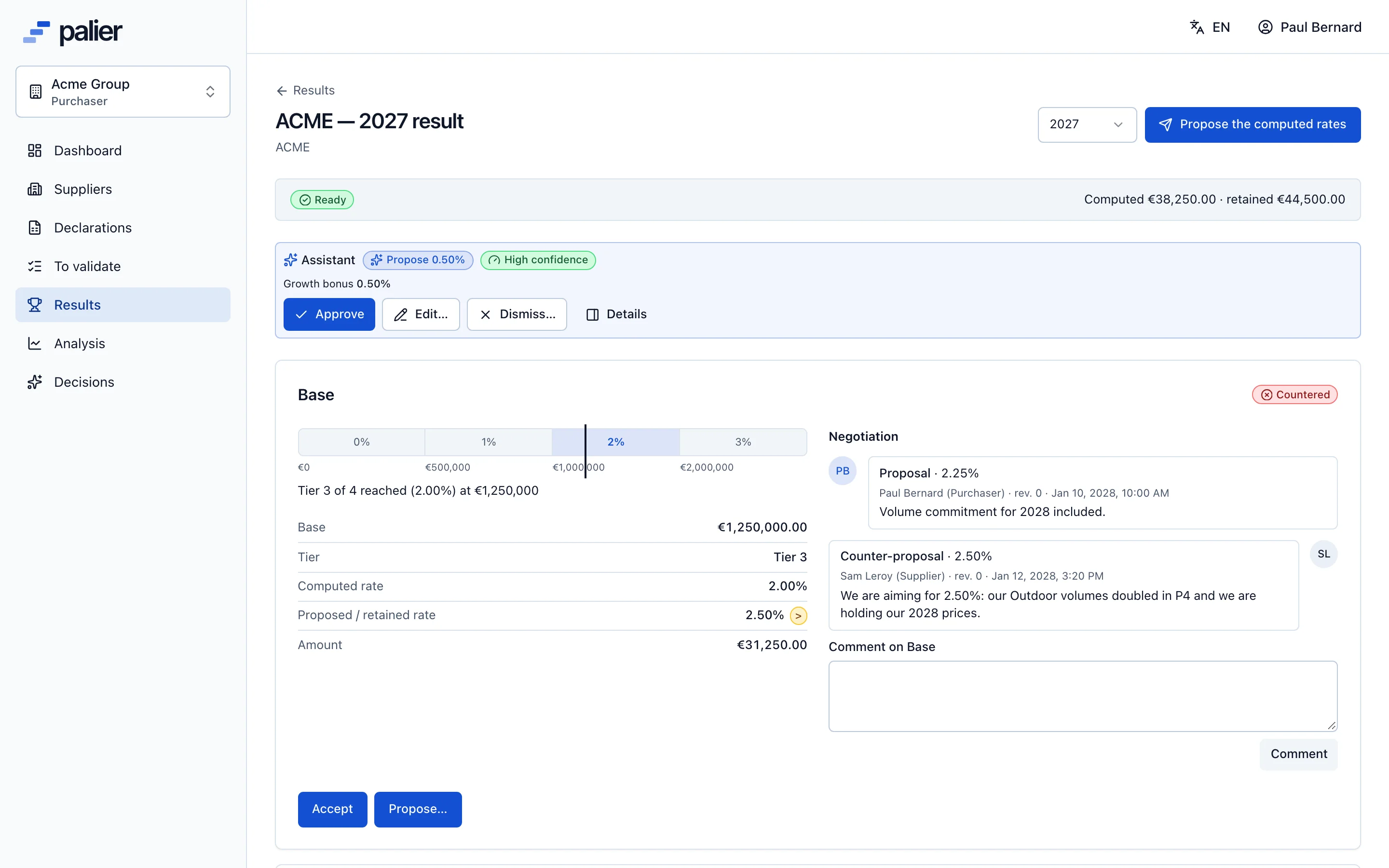
As soon as the last period is validated, Palier computes the tier reached, the computed rate and the amount of every scale. Propose a retained rate, receive a counter, conclude: it all stays in the thread.
- Amounts to the cent, rounded once, rates to four decimals
- Proposal, counter, acceptance or reasoned refusal
- PDF recap sent to both parties once finalised
Analysis and next year’s scale
Prepare the renegotiation with facts
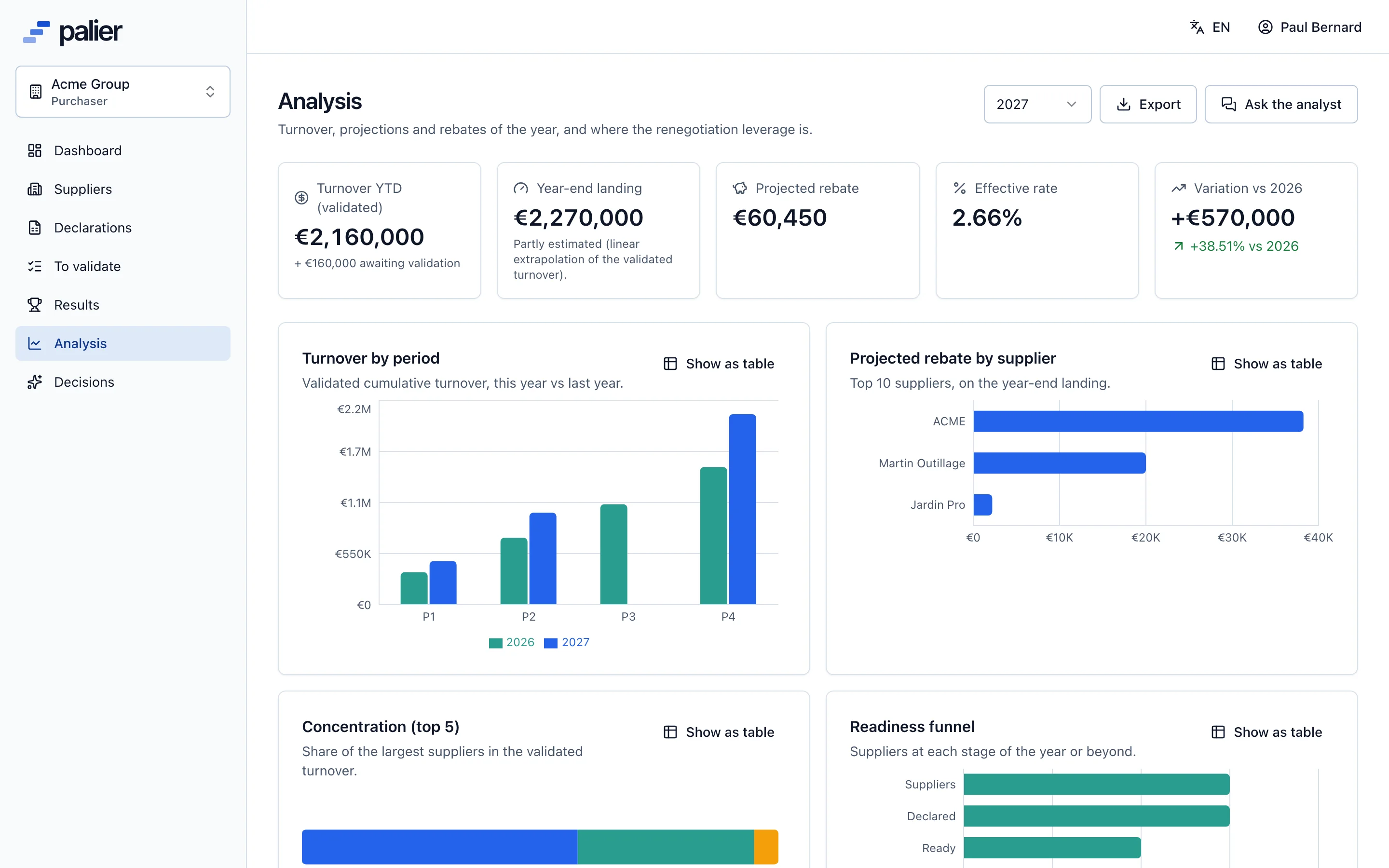
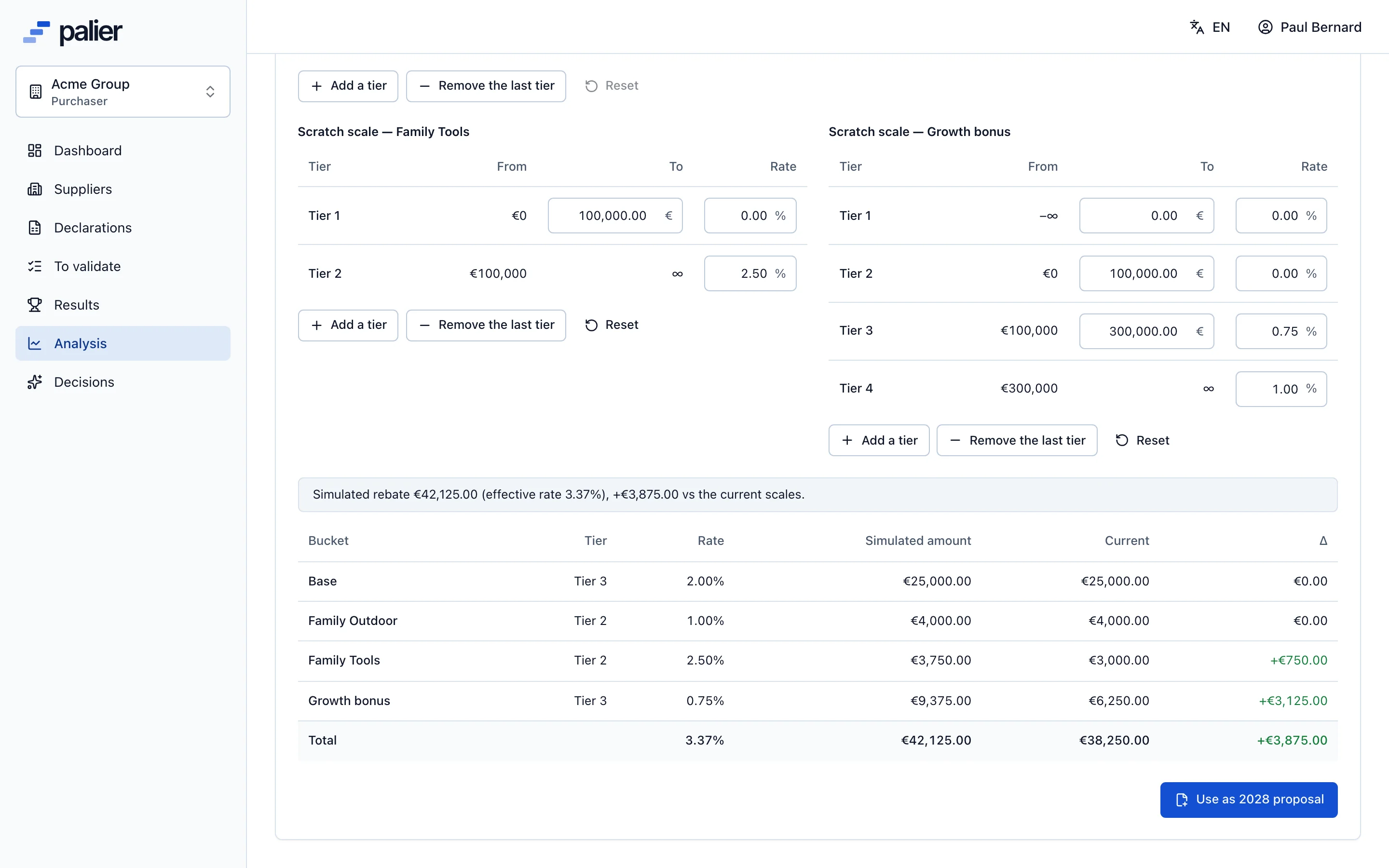
Distance to the next tier, rebate at the next tier, effective rate, year-over-year change: the analysis shows where the leverage is. The simulator tests a new scale on real turnover before you propose it.
- Suppliers ranked by distance to their next tier
- Next year’s scale simulated on validated turnover
- New scale proposed to the supplier, then activated
AI assistant
AI prepares every decision. You make it.
For every submitted declaration, every computed result, every counter-proposal, the assistant gathers the facts, flags anomalies and proposes an action with its rationale and a draft message. You approve, edit or dismiss.
- Facts before judgement
- Figures and checks are computed by the engine, never by the model. A recommendation citing a number absent from its facts is rejected.
- One write path
- Approving a card triggers exactly the action a click would, with you as the author in the audit log.
- Within your policy
- The proposed rate stays inside the range you set. You decide, agent by agent, what the assistant is allowed to do.
- It learns from your choices
- Every approval, edit or dismissal is recorded and used as context for the same supplier next time.
Assistant · Declaration review
High confidenceACME · P3 2027 · Ask a question
- Cumulative turnover down: −12%
- vs prior year: −31%
The cumulative figure declared for P3 is lower than P2’s. ACME’s history shows no quarter-end credit notes, so a question before validating is recommended.
Draft: “Hello, the cumulative turnover declared for P3 is lower than P2’s. Could you confirm the figure?”
1–12
declaration periods per year, your choice
3
kinds of scales: base, families, growth
2
calculation modes: whole or marginal rate
12
automatic checks on every declaration
4
roles: owner, purchaser, viewer, supplier
EN · FR
bilingual interface, emails and PDFs
Who it is for
One platform, three roles around the same figure
Rebates involve several people. Each sees what concerns them, with the right permissions.
Purchasers and buying groups
Collect every supplier’s turnover with automatic reminders, validate in bulk, compute each rebate and negotiate rates and scales with the history in front of you.
For purchasersSuppliers
Declare in minutes, follow your tier in real time, simulate your rebate and answer proposals online, without emailing spreadsheets.
For suppliersFinance teams
Accrue from validated figures and the landing forecast, track the effective rate and find every decision and its author in the audit log.
For finance
Free tool
What does your scale pay out? Find out in 30 seconds.
Enter your tiers and a turnover figure: the rebate calculator gives the tier reached, the amount at the whole and at the marginal rate, the distance to the next tier and what reaching it would pay. The same calculation engine as the application.
Resources
Everything about year-end rebates
- Complete guideYear-end rebates from A to ZDefinition, calculation, tiered scales, negotiation, the yearly cycle, accruals: the reference guide.Read
- CalculationHow to calculate a year-end rebate: formula, method and worked examplesHow to calculate a year-end supplier rebate: the base, tiered scales, whole or marginal rates, growth bonuses and rounding, with step-by-step worked examples.Read
- CalculationTiered rebate scales: whole rate or marginal rate?Whole (retroactive) or marginal (per-slice) rates: two ways to apply a rebate scale, their threshold effects, and how to choose the right one for each supplier.Read
- NegotiationNegotiating year-end rebates: retained rate, counters and next year’s scalePrepare the rebate negotiation with facts: distance to the next tier, growth, history, room to move, handling counters and designing next year’s tier scale.Read
FAQ
Questions we are asked
About year-end rebates in general and Palier in particular.
What is a year-end rebate?
A year-end rebate is a deferred discount a supplier grants its distributor customer at the end of the year, computed on the turnover achieved together. Its rate usually depends on a tiered scale: the higher the turnover, the higher the rate. In France it is called BFA (bonus de fin d’année) or RFA.
How is a year-end rebate calculated?
Rebate = base × rate. The base is the year’s turnover (in total or per product family); the rate comes from the tier reached in the scale. With a whole rate, the reached tier’s rate applies to all turnover; with a marginal rate, each slice earns its own tier’s rate.
Does Palier replace our Excel files?
Yes, for everything about rebates: collecting declarations, checks, calculation, negotiation, history. Excel import and export remain available to load your existing scales and declarations or to feed your other tools.
Do suppliers have to use Palier?
It is recommended: each supplier receives an invitation, sees only its own data and declares its turnover directly. It can type its figures online or import the Excel template exported from Palier, and gets an automatic reminder before each period closes.
Does the AI assistant make decisions for us?
No. The assistant proposes: validate, ask a question, propose a rate, accept a counter. Nothing is executed without a person’s approval, and that person remains the author of the action in the audit log. The assistant can also be switched off.
Is Palier available in French?
Yes. The interface, emails, error messages and PDF recaps exist in French and English. Each user picks a language, and the assistant writes its draft messages in both.
See Palier on your own tier scales
30 minutes through declarations, validation, calculation and negotiation of your rebates. Send us a scale and we will set it up for the demo.
- Demo on your sample data
- In English or French
- No commitment