Suppliers
Supplier rebates: declare, track your tier and negotiate online
Is your distributor customer using Palier? Declare your turnover in minutes, see where you stand on your scale and answer rate proposals without exchanging files.
For you
Less data entry, more visibility
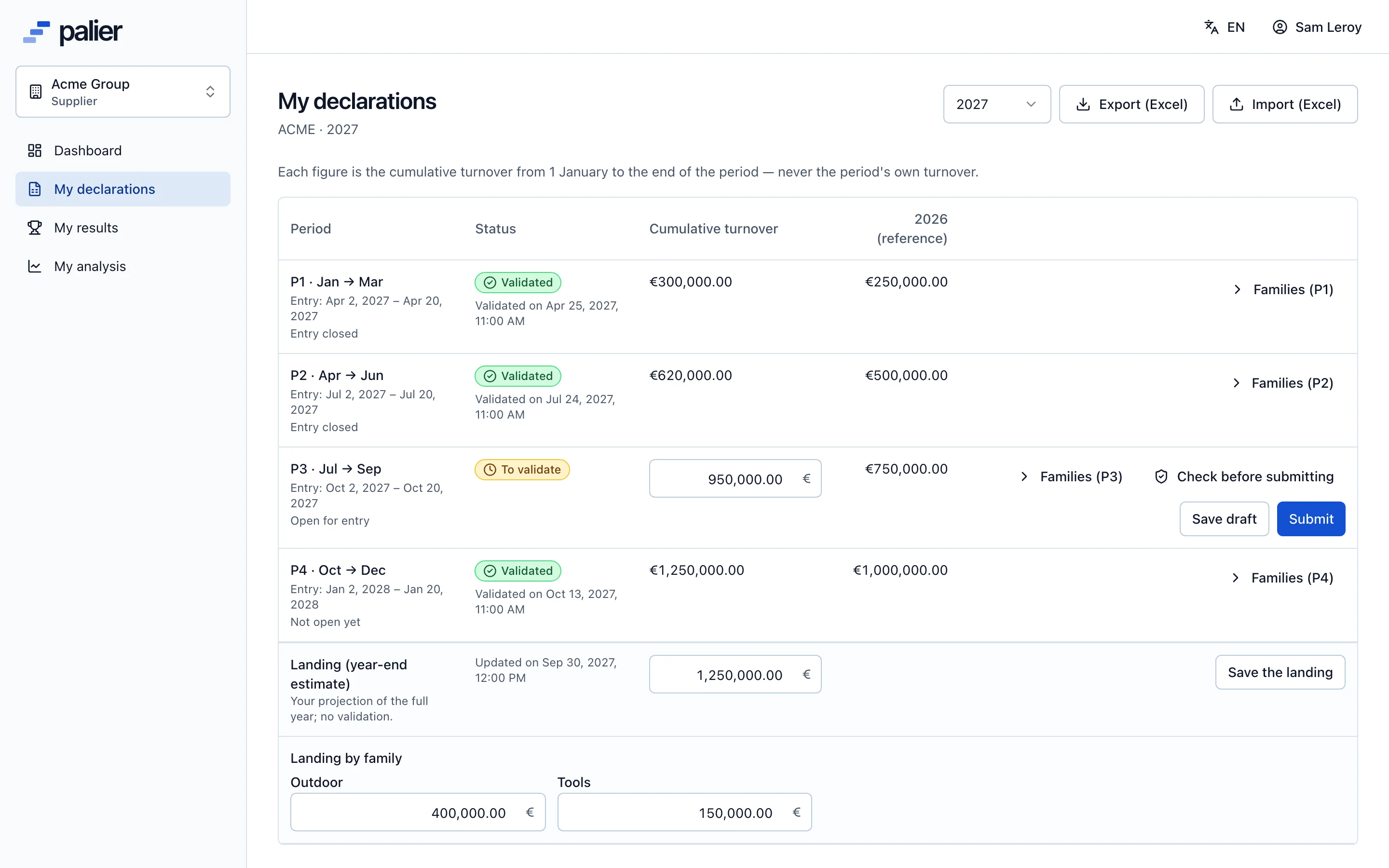
One entry per period
Your cumulative turnover, split by family if needed, in a clear grid; or an import of the Excel template provided.
Your tier, clearly
Your agreement, results and analysis are available: you know which tier you are aiming for and how far it is.
A check before sending
The pre-check flags a cumulative decrease or families that do not add up before you submit.
A written negotiation
Accept, counter or refuse a rate with a message; it all stays in the thread, with dates.
Declare
Declare your turnover in minutes
Each open period shows its closing date. Enter turnover cumulated since 1 January, split it by family if your agreement says so, save a draft or submit. A reminder reaches you before the period closes.
- Last year’s figure for reference
- Saveable drafts, one-click submission
- Visible reason and correction if refused
Track
Know where you stand on your scale at any time
Your scale, the tier reached by your validated turnover, the distance to the next tier and the matching rebate: the essentials to steer your year end.
- Tiers and rates of your agreement
- Distance to the next tier
- Full-year estimate (landing)
Negotiate
Answer rate and scale proposals online
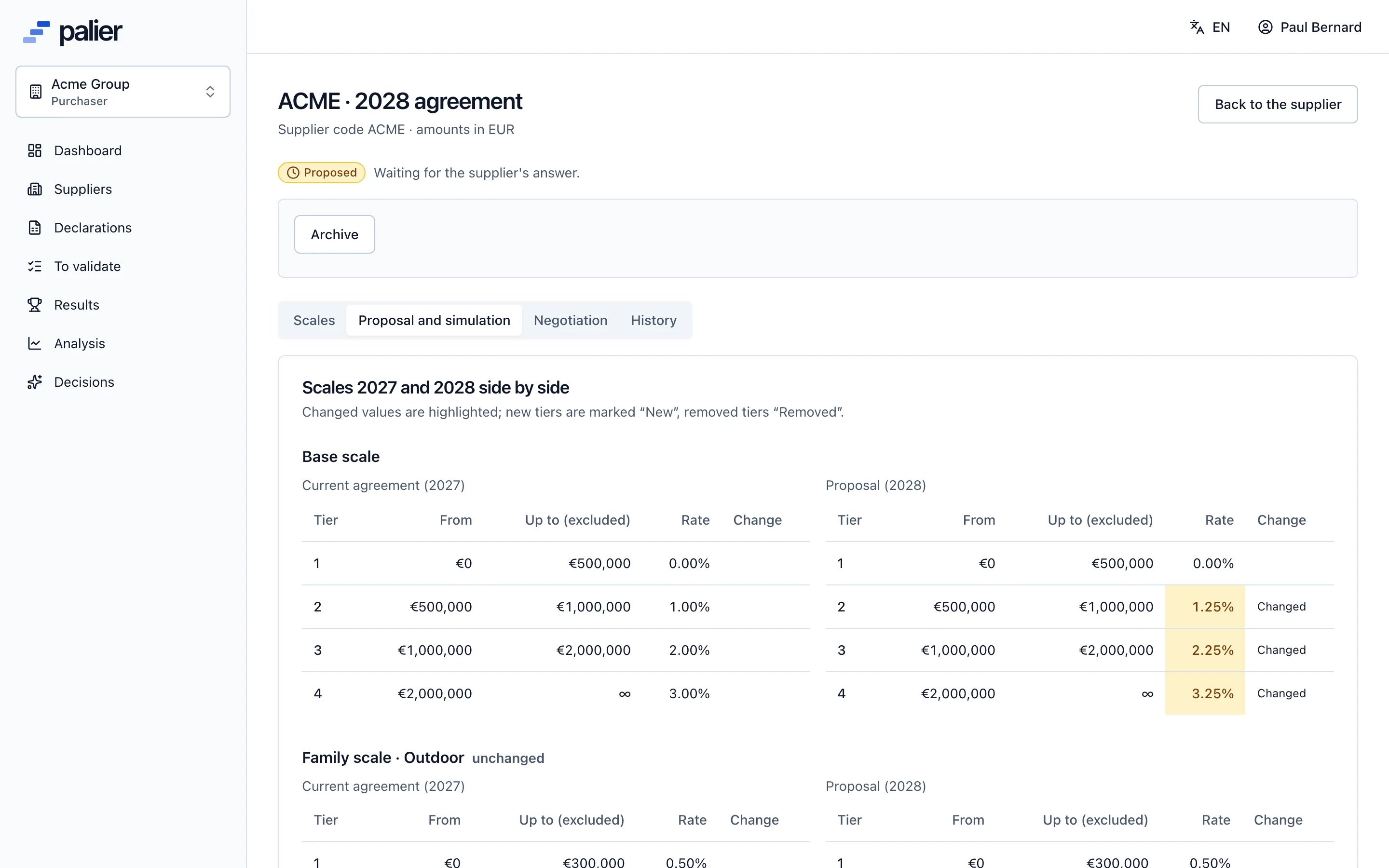
When your customer proposes a retained rate or a new scale for next year, you compare, accept, counter or refuse with a reason. The PDF recap is available once finalised.
- Old and new scales side by side
- Accept per scale or all at once
- Downloadable PDF recap
Your year
Rebates on the supplier side, in five steps
- 1
Accept your customer’s invitation
One email, one password: you reach your space, nothing to install.
- 2
Declare each period
Cumulative turnover, families if needed, and your full-year landing.
- 3
Correct when needed
After a question or a reasoned refusal, you correct and submit again.
- 4
Answer the rate proposal
Accept, counter or refuse, scale by scale.
- 5
Download your recap
The final PDF shows the base, tier, rates and amount.
Questions from suppliers
How do I access Palier as a supplier?
Your customer invites you from its account. You receive an email, choose a password and go straight to your space, in the browser.
I work with several distributors using Palier: do I need several accounts?
No. One login can be linked to several customers; you choose the customer after signing in.
Who sees my figures?
Only the members of your customer’s account (owner, purchasers, viewers) and your own company’s contacts. Your customer’s other suppliers never see your data.
Can I declare from Excel?
Yes. Export your template from Palier, fill it in, then import it: a preview shows every cell accepted or refused before the declaration is submitted.
See Palier on your own tier scales
30 minutes through declarations, validation, calculation and negotiation of your rebates. Send us a scale and we will set it up for the demo.
- Demo on your sample data
- In English or French
- No commitment